Create instant, password protected chat rooms without the need to signup

Niltalk lets you create instant, password protected chat rooms without the need to signup. Simply click the "Create" button, and share the unique chat URL with your peers.
All communication happens over SSL. Niltalk doesn't record or log IP addresses, messages, or peer handles anywhere.
Once a room is created, it has a lifetime of 120 minutes before the first login. Then, the room is automatically deleted after 10 minutes of inactivity (no messages exchanged).
While in a room, you or any of your peers can dispose of the room with the click of a button.
Niltalk is meant for holding short private conversations between groups of people who have mutually agreed to converse. There is no concept of ownership of a room, and introducing ownership complicates the otherwise simple privacy feature of instant disposal by any participant. This also means that Niltalk isn't really meant for starting conversations by opening up a room to a large number of uninvited participants.

https://niltalk.com

Sony Xperia M4 Aqua first impressions: 5-inch HD waterproof smartphone, but comes at a steep price

Sony-Xperia-M4-624x351.png


Sony announced its latest phones from the Xperia series for the Indian market. The Xperia M4 Aqua comes with water-proof and dust-proof certifications. The other phone launched was the Sony Xperia C4 Dual, which is looking at the mid-range segment. First announced at the Mobile World Congress, the Xperia M4 Aqua will start selling in India from May 26. We got to spend some time with the phone post the event and here are our first impressions.

Build and Design

xperia-m4-aqua-white-1240x840-4870bae0f1974bec88f4fcff0fc17cc9
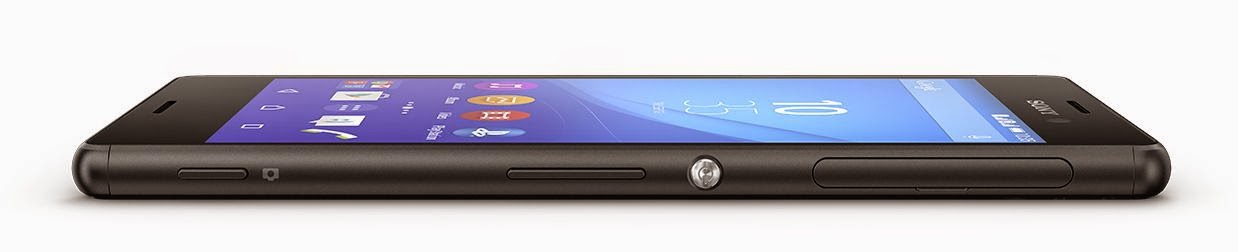
Sony has employed the same design elements that we have come to associate with its Xperia series of smartphones. The Xperia M4 Aqua has a more rounded edges and corners. The phone has a tempered glass display protecting the 5-inch IPS panel. The frame is metallic and the matte silver colour adds a bit of elegance to the phone. On the left hand side you have a microSD card slot and a cap-less microUSB port for data transfer and charging. On the right hand side there is the dual NanoSIM slot on the to covered by a cap, an aluminum power/standby button, a volume rocker and a dedicated camera shutter button down below.
Clipboard011
A 3.5mm audio jack is placed on the top and there are dual front-facing speakers. Overall, the phone has a good build quality and Sony gets a brownie point for providing a capless microUSB port. 
Imagine the annoyance at having to constantly remove the cap when you want to charge the phone. 
The fact that it is just 7.3mm thick and comes with IP65 and IP58 certifications will appeal to many.

Display

xperia-m4-aqua-dual-gallery-03-1240x840-e9f4b2857abcea959e6bcb8060796ddc
The Sony Xperia M4 Aqua sports a 5-inch HD display. It is quite vibrant and thanks to the IPS panel the viewing angles are quite good. There is no Corning Gorilla Glass protection, but you get tempered glass in its place. The display has a propensity to attract smudges though, which becomes evident when the phone is in the sleep mode and that could be a let down for lot of potential buyers.

Chipset, RAM, Storage

The phone houses a Qualcomm Snapdragon 615 system on chip which has a 1.5GHz octa-core processor which is paired with 2GB of RAM. The phone comes with 16GB of storage on board and also has a provision to add in a microSD card slot. We got to use the phone for a brief time and in that time, there were no issues with the phone’s response, camera launching, app-switching and so on. But we will need to run benchmarks on a review device to give a proper verdict on the performance.

Connectivity, OS


E3II_WHITE_PIS_LOCK
The phone comes with a dual-SIM configuration. It has support for 4G LTE networks on one of these SIMs. Apart from this the phone supports Wi-fi 802.11 b/g/n, Bluetooth 4.1, Wi-Fi Direct, DLNA and so on. It also supports GPS with A-GPS and GLONASS. The phone runs Android 5.0 Lollipop with the Xperia UI skin atop it. You will barely see any design language of Lollipop unless you get into the settings menu.

Camera, Battery

Apart from the fact that it is water-proof and dust-proof, the other major USP of the phone is its camera. You get a 13MP rear camera with Sony ExmorRS sensor and a 5MP front-facing camera. Sony has included some features seen on flagship Xperia handsets such as the Z2/Z3/Z3 Compact into the M4 Aqua’s camera software as well. So you get AR Effects, Style Portraits, AR style and so on. Sony claims that the low light capabilities of the M4 Aqua are better than competition, but we will have to test that for ourself.

There is a 2,400 mAh non-removable battery powering the Xperia M4 Aqua which Sony claims can run for two days on single charge on regular use. We will be testing this claim. Apart from this the phone also comes with a Stamina mode setting, which further improves the battery life. This mode worked well with the Xperia Z3 that we had tested last year, so we will see how well it works with the M4 Aqua as well.

Conclusion

The Sony Xperia M4 Aqua has a decent specification set and the waterproofing and dustproofing certifications are appealing. For an outdoors person, the M4 Aqua seems like a good phone and the Snapdragon 615 SoC paired with 2GB of RAM should be quite capable of handling many work and multimedia related functions. But the Rs 24,990 price point may be a hindrance for many, specially now when you have so many flagship-level devices available for much less. The segment of users who are purely looking at a waterproof/dustproof phone is quite niche and majority of the buyers will be looking for a good phone which also comes with the IP certifications. But at Rs 25k price point, there is no reason why a regular user may not select the OnePlus One, a Xiaomi Mi 4 or put in Rs 1,500 more and go for a Samsung Galaxy S5, which is water resistant as well. A price point closer to Rs 20,000 would’ve made the Xperia M4 Aqua quite competitive.








Asus ZenFone 5 Android 5.0 Lollipop Update to Release in 'Next 3-4 Months'

asus_zenfone_5_a501cg

The Android 5.0 Lollipop update for Asus ZenFone 5 has been delayed by 3-4 months, reveals the Taiwanese company.

Asus India once again confirmed the Lollipop update delay in a Facebook post, and said the update for the Asus ZenFone 5 can be expected to start rolling in next 3-4 months, or roughly in August/ September.

The Asus India Facebook page while replying to a user query about Lollipop update for ZenFone 5 said, "It will be released in a span of next 3-4 months! We regret the inconvenience caused to you."
The company first promised the Android 5.0 Lollipop update for its first-generation ZenFone smartphone series in mid-May. Asus however confirmed delay in Android 5.0 Lollipop earlier this month update rollout to the ZenFone 4, ZenFone 5, and ZenFone 6 smartphones due to issues in verification. The Taiwanese company had however not revealed details about an imminent release date for the update.

Considering that the company had suggested issues in verification for all three (ZenFone 4, ZenFone 5, and ZenFone 6) smartphones, we expect the Asus ZenFone 4 and Asus ZenFone 6 to receive the updates in the same period.

Earlier this month, Asus had also confirmed delay in the Lollipop rollout to the Asus PadFone S, which was expected to receive the update in mid-May.

As of now, the LTE-variant of the ZenFone 5 has only received the Android 5.0 Lollipop update. To recall, the Android Lollipop update for the ZenFone 5 LTE was around 820MB in size and upgraded Kindle, Asus Webstorage, and Super Note apps. It also brought new lockscreen which removed standalone wallpaper and weather details (1G RAM variant only); a change to the quick settings/recent app layouts (1G RAM variant only); revamped Dialler and Contacts; removal of in-call animation and cover; addition of My Ocean wallpaper, Day Scene Live Wallpaper, TripAdvisor, and Asus Auto-start Service Manager app, and auto-start service manager, as well as improved VOIP phone call function and music function.


iOS bug causes Messages to crash, iPhone to reboot when a certain text is received


A newly found bug surrounding iOS and Messages has emerged this evening that causes the app to continuously crash when a certain text is received. If the text is received while the phone is on the lock screen, it also causes your iPhone to reboot without any notice or explanation.

Code to Reboot the iPhone Power لُلُصّبُلُلصّبُررً ॣ ॣh ॣ ॣ 冗

This isn’t the first time a bug like this has emerged, in fact it has happened several times in the past. Apple usually fixes the issue in a timely matter, but until it’s fixed it is a rather malicious problem. Thankfully, the ability to crash Messages and reboot someone’s iPhone is limited to iPhone to iPhone communication and a certain specific strand of text. Since the characters strand is so specific, most people should never accidentally experience the crashing. Anyone who does experience the crashing was likely singled out on purpose as a target.

If you want to see examples of the problem, a simple Twitter search will return results from hundreds of people who can’t access their Messages app because of it. As you can see, it’s being used maliciously by many, so hopefully Apple rolls out a fix for it soon.

In the meantime, several workarounds are possible. You can have the person who sent you the malicious message send another message effectively canceling out the initial strand. Another option is to send yourself a message via Siri, the share sheet, or from your Mac.


Source: http://haktuts.com

Android M: Here’s what we know, so far

androidm


Though Google has been tight lipped about the announcement of its next mobile OS, a lot has been already said and written about Android M. With just a couple of days to go before Google finally announces Android M, here’s what we know so far.

Name

It’s quite possible that Google may simply announce its next iteration of the mobile OS as Android M and let the guessing game continue, just like last year. The final version of Android M is reportedly scheduled for August, and could get a name only when it is launched along side the upcoming Nexus devices in September-October. For now, it is internally called Macadamia Nut Cookie or MNC. Many have already taken to Twitter voicing their favourite names like Mud pie, Muffin and so on, but some reports have been betting on Marshmallows.

Battery and RAM

Battery life is one area that Google has been receiving flak and needs to improve. The most recent report reveals that Google has asked its Android team to improve battery life and cut down on the RAM usage. It wants the team to reduce location checking when not required. With these new changes, Google may fix issues such as battery drain due to Play services.

Fingerprint authentication

Android M may include native fingerprint authentication, which is currently seen on a few Android smartphones such as Samsung Galaxy S6, Galaxy S6 Edge, HTC One M9 as well on iOS devices such as iPhone 5S, iPhone 6, iPhone 6 Plus, iPad mini 3, and iPad Air 2. The new functionality will allow users to log in to all of the supported applications on their Android devices without entering a password. Some Android phones in the past have had fingerprint readers, but those were ‘OEM-created solutions’, which means that the fingerprint-scanner feature was created by the smartphone company itself. Google was working on a setup and enrollment process, fingerprint lock screen and “service to manage multiple clients that want to access the fingerprint HAL API”.

More privacy controls

The new iteration of Android will reportedly offer users more detailed choices over what data apps can access such as photos, contacts, and location data. This move closely follows Apple that recently added similar security features. A ZDNet report adds that ‘the change would give a user more granular controls over their data and how it’s used, adding that the option has been present in the past — albeit hidden for developers’ use only’.

Home automation

With Android M, Google may further push its online services into your homes. We’ve been hearing about Google’s new technology called Brillo that is expected to run on low-powered devices independent of Nest using as little as 64MB or 32MB of memory. This means any appliance around the home—the lights, the air conditioner, the security camera and so on—could be running Brillo and connected to the Web, allowing you to control them remotely via a smartphone/PC. This way, Google will be able to provide a backbone for tomorrow’s smart homes.

Virtual Reality

Google is also rumoured to push Android deeper into the virtual reality space. It is believed to be working on a VR version of Android. “It’s less clear what that would look like. Google could surprise us with an entirely new virtual reality headset, or even a revived, VR version of Google Glass. The company said in January it was closing the Explorer program for Glass to focus on developing a new version of the products,” reports PCWorld.


Sony Xperia M4 Aqua launched in India at Rs 24,990: 5-inch display, Snapdragon 615, 13MP camera

Sonyxperia_640-624x351


Sony has launched the Xperia M4 Aqua in India at Rs 24,990. It is now available in black, white and coral colours at Sony Centers, Sony Smartphone Lounges and all major electronic stores across the country. The highlight of Sony’s mid-range smartphone is its OmniBalance waterprooof design and 13MP rear snapper.

The Xperia M4 Aqua is built using tempered glass display, and the 136G waterproof (IP65/8 rated) body features cap-less microUSB charging. Sporting a 5-inch 720p HD display, it is powered by a 64-bit octa-core Qualcomm Snapdragon 615 processor with integrated 4G LTE. It includes 2GB RAM.

On the camera front, it gets a 13MP rear snapper powered by Sony’s Exmor RS mobile sensor with a f2.0 aperture, and an ISO 3200 sensitivity. The device also supports digital compact camera technology and an intelligent Superior Auto Mode, that automatically senses up to 52 different scenarios. For selfie lovers, it comes with a 5MP front-facing camera, promising a super wide-angle lens with an 88° field of view. Portrait Retouch will allow users to add fun finishing refinements. In addition, there is Sony’s full suite of preloaded Xperia Camera apps, Sound Photo for adding short clips to pictures and Movie Creator to convert pictures and videos into thirty second vignette clips.

The device promises two days of battery life. In addition, it also includes the activate Battery Stamina Mode and Ultra Stamina Mode to keep the device running on its core functions for a week.


Microsoft Cortana to support Android, OS platform as part of its Windows 10 companion app

Companion-624x351.png

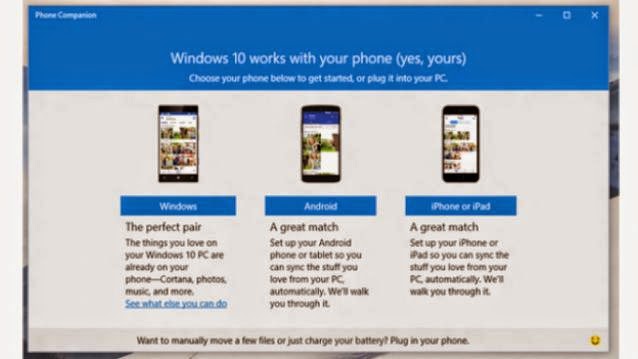
Microsoft announced that it will be adding Cortana support for the Android as well as the iOS platform. This support is part of the Phone Companion app announcement, made by Joe Belfiore via a video, to be available on Android and iOS devices, which lets them access Windows 10 content from either Windows 10 PC or Windows 10 mobile devices.


According to the Windows blog, you will need to download the companion app if you are using an Android or iOS based phone to access certain apps on your Windows 10 PC. For instance, the One Drive app installed on the phone will let you back up photos you take to the Photos app on your Windows 10 PC. Notes written on the PC in OneNote will also reflect on your phone and any note tweaked on the phone will also show up on the PC.

“With the latest upcoming version of the Music app, you’ll be able to store and access your music from OneDrive not only on your PC but now also play it anywhere, for free, on your iOS or Android phone,” says Belfiore on the Windows blog.

Cortana, Microsoft’s personal voice assistant, will also be part of this Companion app. It will come on the Android platform by the end of June whereas on the iOS platform by the end of the year. Cortana support will include notifications for sports, tracking flight schedules and most of the other features seen on the Windows Phone OS and Windows 10 versions. You will need the Phone Companion app installed on your PC to be able to download the Cortana app on your Android phone (from Google Play Store) or iPhone (via the Apple App Store).

“Everything in Cortana’s Notebook will show up across all your devices and any changes you make on one device will be reflected when you use Cortana on any of your other devices. The Cortana companion app will help you complete tasks you begin on your PC wherever you are, on your phone,” said the Windows blog.

However, this does not mean that Cortana will be able to every single thing it can do on the Windows mobile platform, because some functions require a stronger integration with the software and hardware. Features such as toggling settings, opening apps and so on will not be present in the initial versions.